2019-09-11 08:09:58 +00:00
# LeagueStats
2019-04-07 17:54:02 +00:00
2019-12-07 21:58:19 +00:00
[](https://app.netlify.com/sites/leaguestats-gg/deploys)
2020-04-03 10:59:02 +00:00
< a href = "https://discord.gg/RjBzjfk" > < img src = "https://img.shields.io/badge/Discord-join%20chat-738bd7.svg" alt = "LeagueStats.gg official Discord" > < / a >
2019-04-07 17:54:02 +00:00
2020-02-10 20:21:22 +00:00
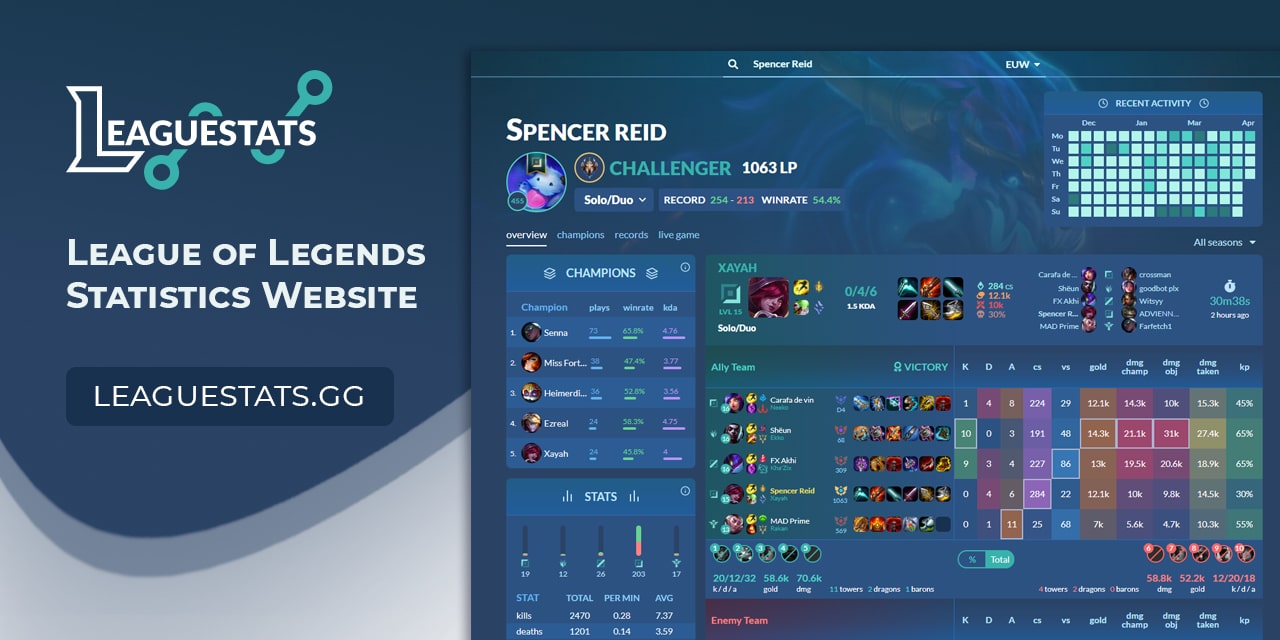
The goal of [leaguestats.gg ](https://leaguestats.gg ) is to provide global complete data for all League of Legends summoners.
2022-02-01 23:28:02 +00:00
Here is an [example ](https://leaguestats.gg/summoner/euw/KCRekkles ) of stats for some summoner.
2019-04-07 17:54:02 +00:00
2021-03-13 21:15:55 +00:00
2019-04-07 17:54:02 +00:00
2022-02-01 22:33:30 +00:00
[](https://www.digitalocean.com/?refcode=4f4a6c382133& utm_campaign=Referral_Invite& utm_medium=Referral_Program& utm_source=badge)
2020-04-22 20:43:30 +00:00
2019-12-07 21:58:19 +00:00
## Installation
Development environment requirements :
2021-09-20 17:57:50 +00:00
2020-10-16 20:41:09 +00:00
- [Node.js ](https://nodejs.org/en/download/ ) >= 12.0.0
2021-09-20 17:57:50 +00:00
- [PostgreSQL ](https://www.postgresql.org/download/ )
2019-12-07 21:58:19 +00:00
- [Redis ](https://redis.io/download )
2021-09-20 17:57:50 +00:00
You can use the `docker-compose.yml` file to quickly setup Postgre and Redis in development.
2022-08-17 16:51:55 +00:00
Setting up the docker container:
```bash
> docker-compose up --build -d
```
2019-12-07 21:58:19 +00:00
Setting up your development environment on your local machine :
2021-09-20 17:57:50 +00:00
2019-12-07 21:58:19 +00:00
```bash
> git clone https://github.com/vkaelin/LeagueStats.git
> cd leaguestats/client
> npm install
# And
> cd leaguestats/server
> npm install
2022-08-20 15:39:31 +00:00
> cp .env.example .env # edit the values (see below for more info)
2021-09-20 17:57:50 +00:00
> node ace migration:run
2019-04-07 17:54:02 +00:00
```
2022-08-17 16:51:55 +00:00
### Env Values
Before running the migrations, you need to add some details to the server .env:
2022-08-20 15:39:31 +00:00
1. To generate the APP_KEY run `node ace generate:key` , copy and paste the value on the respective .env variable;
2022-08-17 16:51:55 +00:00
2. Set the database variables PG_USER, PG_PASSWORD and PG_DB_NAME. If you are using docker,
2022-08-20 15:39:31 +00:00
you can set as below:
2022-08-17 16:51:55 +00:00
```
PG_USER=root
PG_PASSWORD=root
PG_DB_NAME=leaguestats
```
2022-08-17 16:54:41 +00:00
3. For the application work properly, you need a Riot API Key to set it on RIOT_API_KEY .env variable. To know more, take a look to their documentation on [this link ](https://developer.riotgames.com/ ).
2022-08-17 16:51:55 +00:00
2019-12-07 21:58:19 +00:00
## Useful commands
2021-09-20 17:57:50 +00:00
2019-12-07 21:58:19 +00:00
Running the app :
2021-09-20 17:57:50 +00:00
2019-12-07 21:58:19 +00:00
```bash
> cd client
2020-10-16 20:41:09 +00:00
> npm run dev
2019-12-07 21:58:19 +00:00
# And
> cd server
2020-10-16 20:41:09 +00:00
> npm run dev
2019-04-07 17:54:02 +00:00
```
2019-12-07 21:58:19 +00:00
2020-10-16 20:41:09 +00:00
Deploying the app :
2021-09-20 17:57:50 +00:00
2019-12-07 21:58:19 +00:00
```bash
> cd client
> npm run build
2020-10-16 20:41:09 +00:00
# And
> cd server
> npm run build
> node build/server.js
2019-04-07 17:54:02 +00:00
```
2019-12-07 21:58:19 +00:00
## Contributing
Do not hesitate to contribute to the project by adapting or adding features ! Bug reports or pull requests are welcome.
## License
2020-04-05 13:58:50 +00:00
NonCommercial-ShareAlike 4.0 International (CC BY-NC-SA 4.0)
https://creativecommons.org/licenses/by-nc-sa/4.0/
2019-12-07 21:58:19 +00:00
### You are free to:
2020-04-05 13:58:50 +00:00
Share — copy and redistribute the material in any medium or format
2019-12-07 21:58:19 +00:00
Adapt — remix, transform, and build upon the material
### Under the following terms:
NonCommercial — You may not use the material for commercial purposes.
ShareAlike — If you remix, transform, or build upon the material, you must distribute your contributions under the same license as the original.